Confirmation Messages

Confirmation messages are a great way to communicate with guests immediately after a booking. The hotel has the opportunity to customise the structure of these emails using default variables to include specific booking details.
How to Edit the Email Structure?
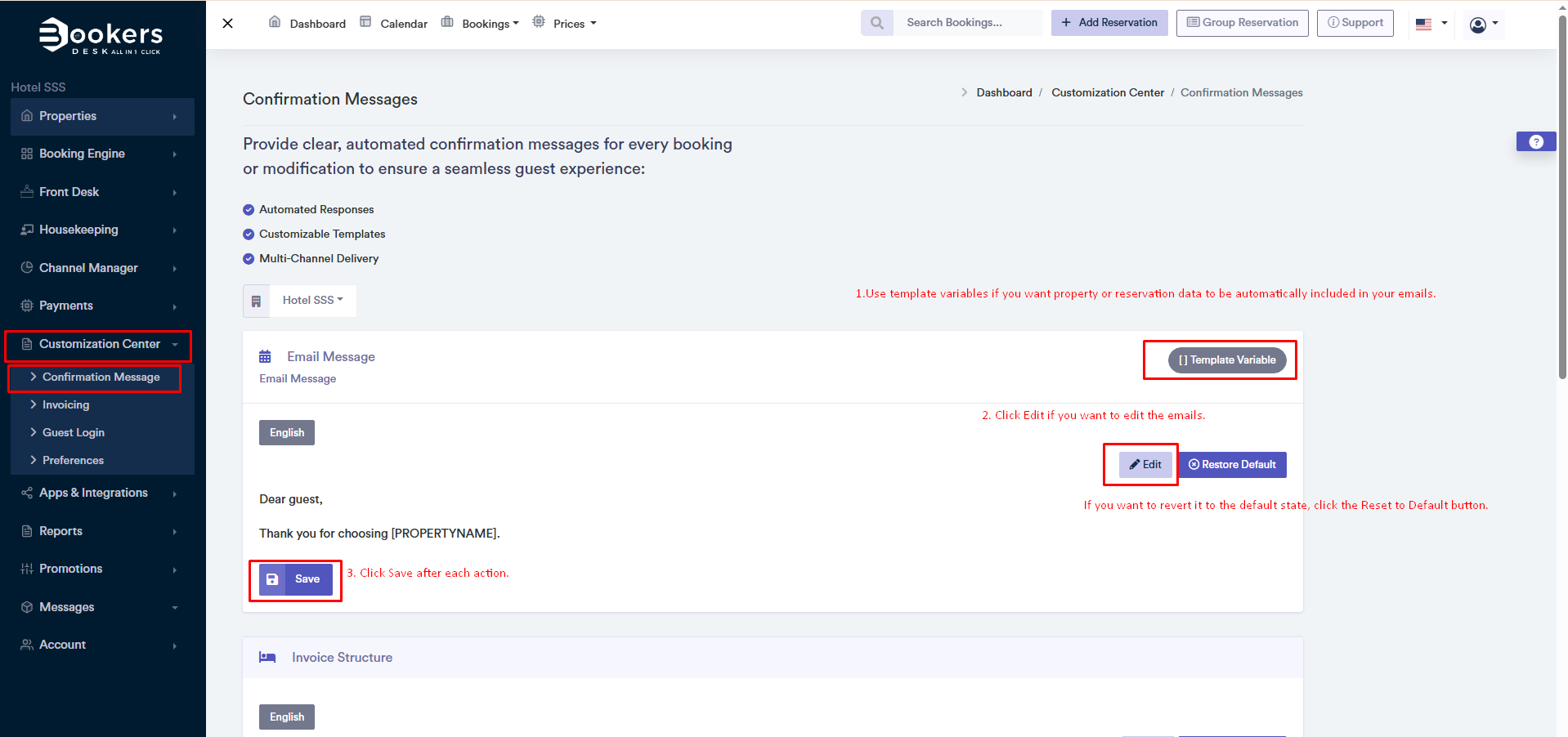
You can find and manage confirmation messages by following this path: Panel > Customisation Centre > Confirmation Messages
How to Customise Confirmation Messages?
- Go to Panel > Customisation Centre > Confirmation Messages.
- Click the Edit button to modify the message.
- Use the template variables on the right to add dynamic information.
- Once you've made the changes, click Save to save the changes.
How to Customise the Invoice?
- Go to Panel > Customisation Centre > Confirmation Messages
- Click the Edit button to modify the invoice structure.
- Use template variables to automatically insert information.
- You can enable or disable options as desired to tailor the invoice format.
- Once you've made the changes, click Save to save the changes.
Why is Customisation Important?
- For more professional communication with guests.
- To ensure that invoices contain all necessary information.
- To create a more personalised experience for your property.